The Complete Guide to Field Photo Documentation in 2026
Last year, a home inspector in Texas lost a $12,000 insurance dispute because he could not prove when and where his photos were taken. He had over 200 photos from the site visit. Thorough coverage, every room documented. But they were sitting in his camera roll with no GPS data, no captions, and no timestamps his client's insurer would accept. Just a pile of unnamed JPEGs.
That situation plays out constantly. Field professionals take hundreds of photos, spend hours wrangling them into something a client can use, and still end up with documentation that would not survive a serious challenge. Or they skip the reporting step entirely and hope nobody ever asks for proof.
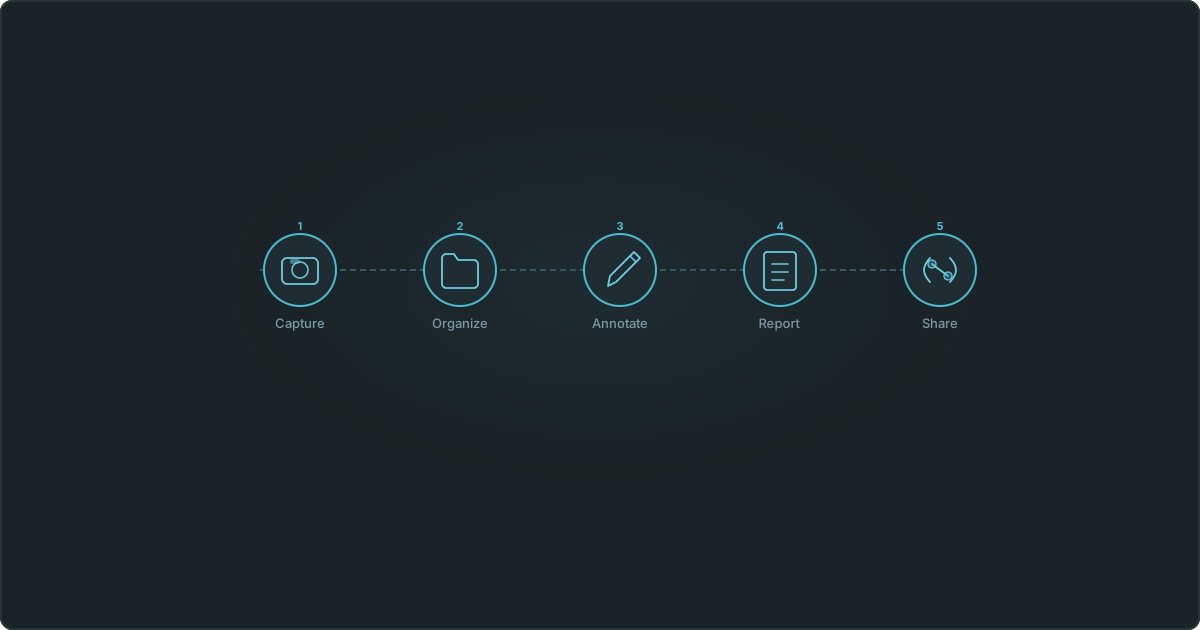
It does not have to be this painful. This guide breaks field photo documentation into five stages, from the moment you take the shot to the moment your client opens the report.
What is field photo documentation?
Field photo documentation is the process of capturing, organizing, and reporting on photographs taken at a job site or inspection location. You are building a structured visual record that proves what conditions existed at a specific place and time.
That means more than just taking pictures. It includes GPS coordinates, timestamps, captions, annotations, and a formatted report that ties everything together. Done well, the result is a record that holds up in court, satisfies regulators, and gives clients confidence in your work.
Who uses it?
- Home inspectors documenting property conditions for buyers, sellers, and insurance adjusters
- Construction teams tracking progress and proving work completion across project phases
- Environmental consultants recording site conditions for compliance and remediation
- Roofing inspectors cataloging storm damage and pre-existing conditions for claims
- Utility workers documenting infrastructure along transmission corridors
- Property managers recording unit conditions during move-in and move-out
Different industries, same basic process.
Five stages of field documentation
Stage 1: Capture
Everything starts with how you take the photo. Get this right and the rest of the workflow is easy. Get it wrong and you are cleaning up problems for hours.
Enable GPS on every device you use. This is the one thing that matters most. GPS coordinates embedded in your photo's EXIF data prove the exact location where the shot was taken. On iPhone, check Settings > Privacy & Security > Location Services and confirm your camera app has access. On Android, enable location tags in your camera settings. Do this check before every site visit, not after.
Some documentation platforms can also extract compass direction, which tells you which wall or elevation you were facing. Hold your phone steady and face the subject squarely rather than shooting at an angle.
Before you leave any site, run through a shot list. For a home inspection: exterior (all four elevations), roof, foundation, electrical panel, HVAC, plumbing, attic, crawl space, and any defects. For a construction progress visit: active work areas, material staging, safety conditions, overall site condition. The "I forgot to photograph the east wall" realization always hits on the drive home, and by then it is too late.
If you photograph the same area across multiple visits, shoot from the same spot each time. Week over week progress photos taken from the same vantage point are far more useful than random angles. They create a visual timeline anyone can follow.
One more thing: take more photos than you think you need. Storage is cheap. Missing a photo is not.
Stage 2: Organize
A thousand photos in a camera roll is not documentation. It is a mess that gets worse every week.
Group your work into projects (one per job site or client engagement). Within each project, create surveys for each visit or inspection type. Think of it as Project > Survey > Photos. A survey might be "Initial Inspection, April 3" or "Week 8 Progress." When a client asks for photos from a specific visit, you go straight to that survey instead of scrolling through thousands of images.
Use a naming convention your team actually follows. Include the address or project number in the project name. Name surveys with the date and visit type. This sounds tedious until you have 50 active projects and cannot find anything.
Upload photos the same day you take them. Do not wait until Friday. Phones get lost. They break. Camera rolls get accidentally wiped. If you have cell service on site, upload in real time. After uploading, spot-check that the GPS data and metadata came through intact. A photo that uploads without its location is worth much less.
Stage 3: Annotate
A photo shows what was there. An annotation explains why it matters.
Caption every photo. This is the step most people skip, and it is the one that costs the most time later. "IMG_4872.jpg" tells you nothing three months from now. "North wall, 2nd floor, hairline crack at beam connection, approx 4 inches" tells the full story. Good captions answer three questions: where is this, what does it show, and why does it matter. Keep them under 150 characters. You are writing a label, not a paragraph.
Caption on site or immediately after the visit. If you wait three days, you will forget what half the photos were for.
Sometimes the photo alone does not make the issue obvious. An arrow pointing to a crack, a circle around a corroded fitting, or a text label with a measurement makes it self explanatory. Markup tools are worth using for defects that are hard to spot in a wide angle shot, areas that need follow-up on the next visit, and anything where orientation could be confusing.
If your team has multiple people documenting, agree on a captioning style and a color scheme for markups. Red for defects, blue for reference points, green for completed items, whatever works. Consistency across team members makes the final reports look professional instead of thrown together.
Stage 4: Report
Organized, captioned, geotagged photos are useful. A formatted report with those same photos is what you actually hand to the client.
Photo log reports are the formal record. They go to the client, the inspector, the insurance adjuster, or the arbitrator. They turn raw documentation into a deliverable.
Generate them within 24 hours of the site visit. Details are fresh, you can catch gaps in your coverage, and the report does not feel like an afterthought. Every photo in the report should show its caption, date, time, and GPS coordinates. A photo with a timestamp and coordinates is evidence. Without them, it is just a picture.
Stick to one or two photos per page with captions below. Cramming six tiny photos onto one page saves paper and helps nobody. Name reports clearly: "Site Visit Report, 123 Main St, April 3 2026" is better than "Report_final_v2" in every possible way.
Keep every report you generate. You will need to reference one from six months ago at the worst possible time.
Stage 5: Share
The last step is getting documentation into the right hands without losing control of it.
Emailing ZIP files of photos is insecure and annoying for everyone involved. A password protected share link lets your client view organized photos and download reports through their browser. You control who has access and for how long.
Set expiration dates on share links. A link for a punch list walkthrough does not need to be active three months later. Give clients view only access so they can browse and download but not edit or delete anything. And keep a record of who you shared what with and when. That paper trail matters if questions come up later about what information was provided.
Tips by industry
Construction. Progress documentation is cumulative. You are building a visual timeline over weeks or months. Photograph the same areas from the same vantage points on every visit. Pay special attention to work that will be covered up: rebar before a pour, rough-in before drywall, waterproofing before backfill. Once it is covered, your photos are the only proof it was done right.
Environmental monitoring. Regulatory agencies care about metadata more than almost any other audience. GPS coordinates, timestamps, and chain of custody can make or break a compliance filing. Plot your photos on a map to verify you actually covered the entire site.
Roofing. Insurance adjusters review hundreds of claims a week. Your report needs to stand on its own without a follow-up call. Photograph all four elevations, every visible defect, and wide shots that show overall condition. Annotate damage clearly. The easier you make the adjuster's job, the faster things move.
Home inspection. Your clients are often first-time buyers who do not know what "efflorescence on the CMU wall" means. Write captions for a non-technical reader. "White mineral deposits on basement block wall, indicates moisture intrusion" does the job. Your report is part deliverable, part education.
Mistakes that cost people time and money
GPS disabled on the camera. It happens more than you would think. One visit without location data creates a gap in your records that you cannot fix after the fact.
No captions. A thousand uncaptioned photos are barely more useful than no photos. Caption as you shoot, not three days later at your desk.
Inconsistent schedule. Photographing thoroughly on Monday and skipping Wednesday creates a hole in your timeline. If a dispute happens, that gap will get noticed.
Local storage only. If your documentation lives on one device, it is one accident away from being gone.
Emailing sensitive files unprotected. Attachments get forwarded, intercepted, or buried. Use sharing methods with access controls.
Delaying reports. A report generated weeks after the visit is less reliable and less credible. Build reporting into your same-day or next-day routine.
Choosing a documentation tool
Following this workflow by hand is doable, but it is slow. A purpose built tool handles the repetitive parts so you can focus on the actual inspection.
The things that matter most: automatic GPS extraction so you are not entering coordinates manually. Structured organization with projects and surveys, not one flat photo library. Built-in markup tools so you can annotate in the same place you organize. Report generation that takes seconds instead of an hour in Word. And secure sharing with password protection and expiration dates.
Vortyk was built around exactly this workflow, from capture through client delivery, for inspectors and field teams who need organized documentation without the overhead. You can see the full feature set on the features page.
Where to start
If your photos currently live in your camera roll with no structure, start with organization. If your photos are organized but have no captions, start there. If you are doing everything except generating reports, that is your next step.
You do not need to overhaul your entire process at once. Pick the stage where you are losing the most time or taking the most risk, fix that, and move on to the next one.
Still wasting hours on field reports?
Start your 14-day free trial. Generate your first report in minutes.
Start Free TrialMore from the blog